
Boost Your Website’s Performance: 8 Tips for Speed Score Optimization
Boost Your Website’s Performance: 8 Tips for Speed Score Optimization
In today’s fast-paced digital realm, where seconds can make the difference between capturing a customer’s attention or losing them to the abyss of slow-loading web pages, website speed has emerged as the unsung hero of online success. Imagine your website as the front door to your business; would you want your customers to stand idly by, tapping their feet in impatience as the door inches open, or would you rather greet them with a swift, seamless welcome?
The need for speed in the online world cannot be overstated. It’s not merely about user convenience; it’s a pivotal factor in determining your website’s fate in search engine rankings, user engagement, and ultimately, your business’s success. This article is your compass to navigate the complex terrain of website speed optimization. We’ll delve into the significance of those elusive “speed scores” that often hold the keys to digital prosperity.
Why Speed Matters
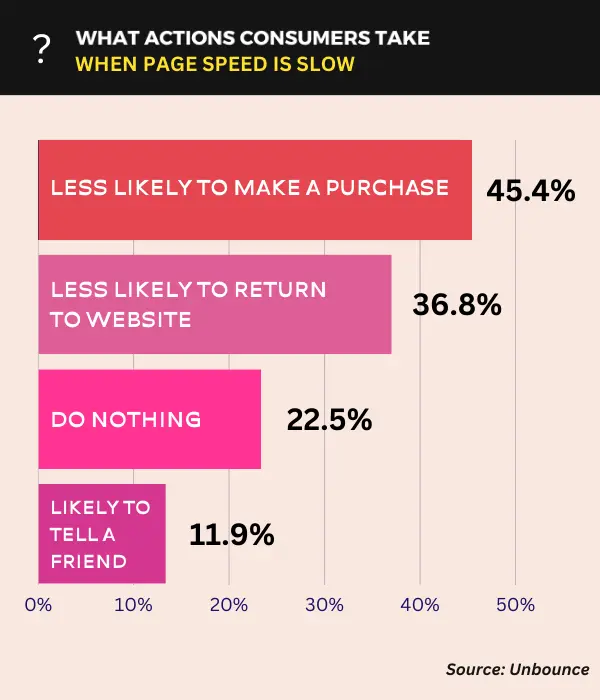
Slow-loading websites undermine user satisfaction, leading to a high bounce rate – a metric that measures the percentage of visitors who navigate away from a site after viewing just one page. High bounce rates are a red flag for businesses, indicating that visitors aren’t finding what they need quickly, potentially costing you customers and revenue.
Furthermore, website speed has a profound impact on SEO (Search Engine Optimization) and search engine rankings. Search engines, particularly Google, have made speed a critical ranking factor. Faster-loading sites are more likely to appear higher in search results, making them more visible to potential customers. Conversely, slower sites may find themselves relegated to the obscurity of search engine results, missing out on valuable organic traffic.
In essence, website speed isn’t a mere technical detail; it’s a linchpin of online success. It shapes the user experience, influences bounce rates, and directly impacts your website’s visibility in search engine rankings, making it an indispensable aspect of modern business strategy.

Understanding Speed Scores
Speed scores are numerical assessments that provide a concise measure of a website’s loading performance. These scores encapsulate the user experience by quantifying how quickly a webpage loads and becomes interactive. They are vital for comprehending and optimizing website speed.
A typical speed score, such as those provided by tools like Google PageSpeed Insights or GTmetrix, is often presented on a scale from 0 to 100, with higher scores signifying superior speed and performance.
To compute speed scores, these tools analyze a multitude of factors, including the volume of page content, the efficiency of code, server response times, and the utilization of browser caching. Moreover, they consider mobile and desktop loading speeds, catering to diverse user experiences.
Speed scores are more than just numbers; they reflect your website’s ability to meet user expectations and, subsequently, impact user satisfaction and engagement. A high score denotes a fast-loading, responsive website, enhancing user retention and SEO ranking. Conversely, a low score necessitates optimizations to prevent sluggish loading times that can drive visitors away. Understanding and optimizing these scores is fundamental to delivering an exceptional online experience and achieving online success.
Tips for Speed Score Optimization

-
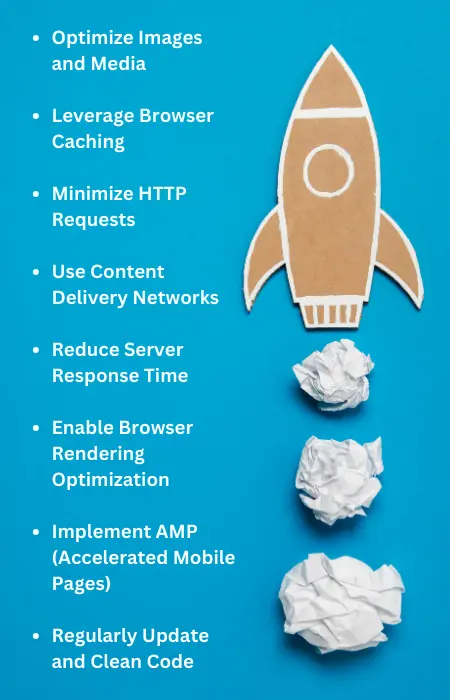
1. Optimize Images and Media: Images and media files are often the heaviest elements on a webpage, and if not managed properly, they can significantly slow down load times. To optimize speed scores, consider image compression to reduce file sizes without compromising quality. Additionally, implement lazy loading, a technique that loads images only as the user scrolls down the page, saving bandwidth and improving initial load times. These strategies enhance user experience and contribute to higher speed scores.
-
2. Leverage Browser Caching: Browser caching stores static assets, such as images and stylesheets, in a user’s browser. This means that when visitors return to your site, their browser can load these assets from their local cache rather than re-downloading them from the server. This reduces server load and significantly improves load times, as the browser only needs to fetch updated content.
-
3. Minimize HTTP Requests: Each element on a webpage (images, stylesheets, scripts) requires an HTTP request. Excessive requests can slow down the load time. Combine and minify CSS and JavaScript files to reduce the number of requests. Also, consider using CSS sprites to combine multiple images into one, further decreasing requests and boosting speed.
-
4. Use Content Delivery Networks (CDNs): CDNs are a network of servers distributed globally that cache and serve website content from locations closest to the user. By leveraging CDNs, you can drastically reduce the physical distance data needs to travel, resulting in faster load times. This is especially crucial for businesses with a global audience, as it ensures consistent speed and reliability for users worldwide.
-
5. Reduce Server Response Time: The time it takes for your server to respond to a user’s request plays a significant role in website speed. Optimize server performance by using efficient coding practices, optimizing database queries, and investing in quality hosting services. Faster server responses lead to quicker page rendering and improved speed scores.
-
6. Enable Browser Rendering Optimization: Techniques like asynchronous (async) and deferred (defer) script loading can optimize how browsers handle JavaScript, ensuring that critical content is rendered first. This prevents scripts from blocking page rendering, allowing for faster perceived load times and better user experience.
-
7. Implement AMP (Accelerated Mobile Pages): Accelerated Mobile Pages (AMP) is an open-source framework that prioritizes speed and user experience on mobile devices. Implementing AMP versions of your pages can significantly improve loading times on smartphones and tablets, which is crucial in today’s mobile-driven world. AMP pages often receive preferential treatment in mobile search results, enhancing your SEO efforts.
-
8. Regularly Update and Clean Code: Clean, well-structured code not only enhances website security but also improves speed. Outdated or redundant code can slow down your site. Regularly update your website’s software, plugins, and libraries. Remove unnecessary elements, code bloat, and unused features to streamline your website’s performance. Clean code contributes to faster load times and better overall speed scores.
Incorporating Core Web Vitals for Speed Score Optimization
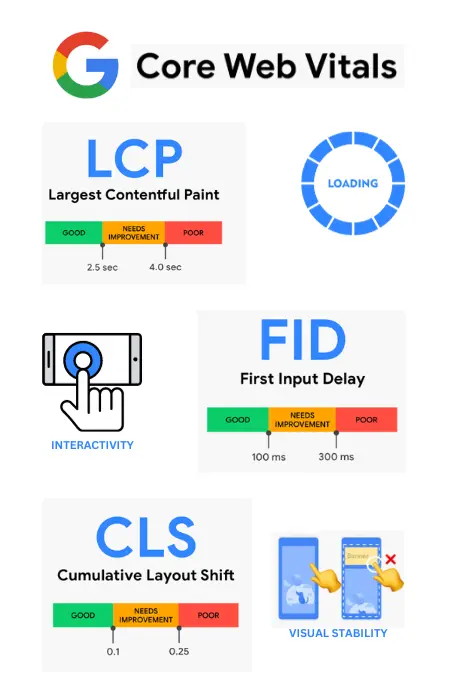
In the quest to boost speed scores and enhance user experience, it’s crucial to pay attention to Core Web Vitals. Core Web Vitals are a set of user-centric metrics introduced by Google. One of the most critical Core Web Vitals is Largest Contentful Paint (LCP), which measures the loading performance of a webpage. LCP focuses on the time it takes for the largest content element, like an image or a block of text, to become visible to users. A fast LCP score is vital because it directly impacts how quickly visitors perceive your site’s loading speed.
Other Core Web Vitals, such as First Input Delay (FID) and Cumulative Layout Shift (CLS), also play pivotal roles in evaluating user experience. FID measures how responsive a webpage is to user interactions, while CLS assesses visual stability.
To optimize your speed scores comprehensively, prioritize these Core Web Vitals alongside technical factors like server response times, efficient code, and leveraging browser caching. By addressing both user-centric metrics and technical aspects, you can create a seamless, fast-loading website that excels in both user satisfaction and search engine rankings.
Testing and Monitoring
Continual testing and monitoring of your website’s speed are imperative for maintaining optimal performance and ensuring a seamless user experience. Here’s why it’s crucial:
Consistency is Key: Websites are dynamic; they evolve with new content, features, and updates. What might be lightning-fast today could become sluggish tomorrow due to changes or increased traffic. Regular testing helps you identify and address speed bottlenecks as they arise, ensuring consistent performance.
User Expectations: User expectations for website speed are ever-increasing. Studies show that even a one-second delay can lead to a significant drop in conversions. By monitoring and optimizing speed, you meet and exceed user expectations, resulting in higher satisfaction and retention rates.
Search Engine Rankings: Search engines, such as Google, consider website speed in their ranking algorithms. Regular monitoring ensures you don’t fall behind, potentially losing valuable organic traffic and visibility.
To assist in this endeavor, various tools and services are available. Google PageSpeed Insights, GTmetrix, Pingdom, and WebPageTest are popular choices for evaluating speed scores and pinpointing areas for improvement.

Conclusion
Throughout this article, we’ve explored the critical role speed plays in user experience, SEO rankings, and overall success. To summarize, swift loading times, as measured by speed scores, are the key to keeping visitors engaged and search engines impressed.
Remember, a faster website isn’t just a technical feat; it’s a strategic advantage that can elevate your business above the competition. Start optimizing your speed scores today to secure a brighter, faster future for your online presence.
Experience the transformative power of optimized website speed. Contact Sage Titans today and let our team of SEO experts, UX analysts, and digital marketing specialists propel your online presence to new heights. Don’t miss out on the opportunities that a faster, more efficient website can bring to your business.

Feel FREE To share this article with your friends:
Facebook
Twitter
LinkedIn
WhatsApp